
Custom Templates for Consistent Clinical Notes

Create reusable templates for AI Scribe so your notes follow the same structure every time - across video, phone, and in-person consults.


image-png-Sep-24-2025-12-57-47-6

Your format. Your sections. Your workflow.

Consistent notes, less mental drain

Custom Templates help your team document in a consistent, clinic-approved format - regardless of who delivers the consult.

More consistency

Reduce variation in structure and quality across clinicians

Less time formatting

Spend effort on clinical meaning, not layout

Cleaner governance

Standardised records support internal review and QA

Create, manage, and apply templates

Create a template

Dashboard → AI Notes → Templates Create Template. Start simple or detailed - you can refine anytime.

Refine your structure

Edit your template as your workflow evolves, then re-generate notes to match the latest version.

Manage your library

Use the Actions menu to Edit, Duplicate, or Delete templates so your library stays tidy and current.

Apply to a consult

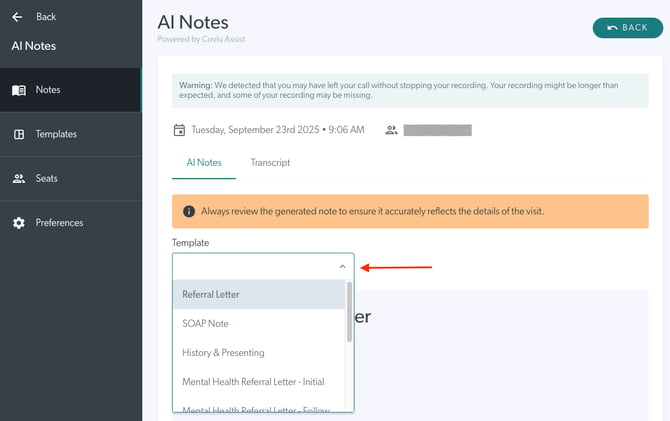
Go to AI Notes, select a consultation, then choose a template from the dropdown to generate a new note. Use multiple templates if needed, and switch anytime to compare outputs.

Get AI Scribing

Select your template, generate your draft, then review and edit as needed - so you finish the consult with a note that is ready to save or copy into your clinical record.

coviu-tips

Tips for best results

  • Be specific: Clear prompts drive clearer outputs

  • Use structure: Break templates into headings and subsections

  • Keep it focused: Avoid overly broad templates that invite irrelevant content

Custom Template FAQs

Can I change a template after I create it?

Yes. Edit anytime, then re-generate notes using the revised version.

Can different clinicians use different templates?

Yes. Select the best template per consult while keeping a shared clinic library.

Can I use more than one template in the same consult?

Yes. Apply multiple templates within the same note if needed.

Can I switch templates after generating a note?

Yes. Change the template anytime to compare outputs.

Do templates work for phone and in-person consults too?

Yes. Templates apply across consult types.

Back to top

Consistent documentation, no extra effort

Create your first template, test it on real consults, and refine as you go. Your format, on autopilot.


No credit card required