
Every booking gets its forms, without anyone sending them
Your Nookal appointment book says who is coming on Thursday. It doesn't say who is ready. Coviu chases whatever is still outstanding, and the answers land in the client record.
Built on your Nookal appointment book
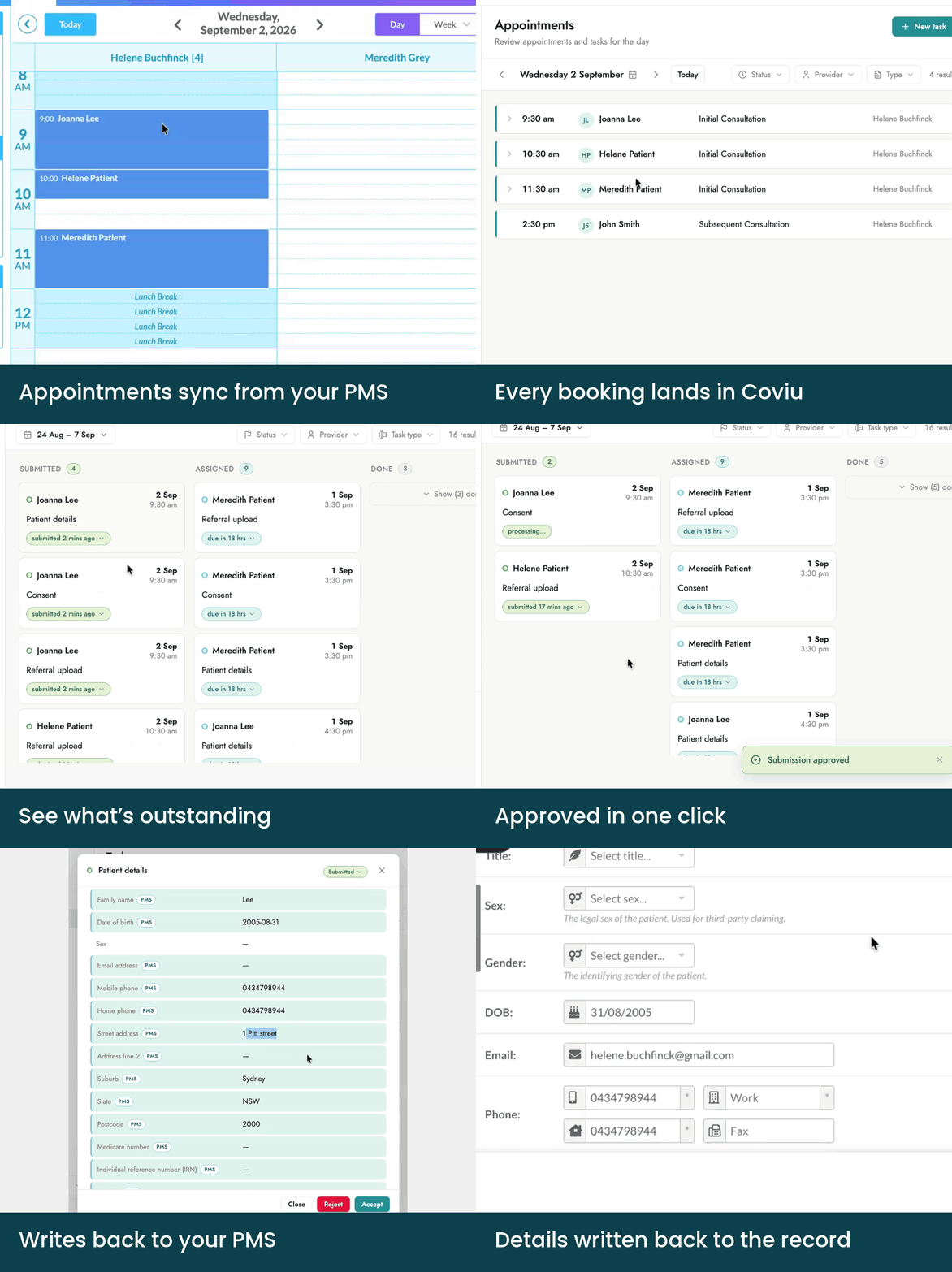
Coviu runs on the practitioners, appointment types and patients already in Nookal. One link carries everything that appointment needs, Coviu chases whatever is still outstanding, and one screen shows where every patient is up to.
How it works
Everything between the booking and the appointment, running on its own.
Appointment Booked
You book the appointment in Nookal as usual.
Forms sent automatically
Coviu reads the appointment type from Nookal and sends everything that type requires, on the timing you set. An initial assessment can ask for different things than a follow-up or a group session.
One secure link
The client receives an SMS with a single secure link to everything they need to complete. No apps, no passwords, no printing forms at home.
Coviu does the chasing
If something is still outstanding, Coviu follows up on the schedule you set. You choose the timing and the wording, and you can step in at any point.
Straight back into Nookal
One click sends the completed forms and client details into Nookal. The client record updates and the form is filed against it. Anything Nookal doesn't accept from outside software stays on the attached form.
"At the moment it's so fiddly, we just don't bother with even attempting to do that."
Practice Manager
Why multi-practitioner clinics choose Coviu
One location or five, you get one view of what's been sent, what's come back and what still needs attention. Nothing rests on memory, or on who was on the desk that day.
Clients arrive prepared
Everything collected before they arrive, so the session starts on time.
Your team stops chasing
Coviu follows up on what's outstanding, on the schedule you set, so it isn't a job someone has to remember.
The whole day at a glance
One screen, every appointment, and where each client is up to.
No double handling
Completed forms and details go straight into the Nookal record instead of being typed in again.
See who has arrived, not just who is booked
Telehealth consults happen in Coviu, so the screen that tracks forms also shows the waiting room. See who has arrived and who hasn't, instead of waiting on an empty screen.
Built for Australian health data
Client information is encrypted, held in Australia, and never sold, shared for advertising or used to train AI models. Coviu connects to Nookal through an API key you create, and you can disable it in Nookal at any time.
Connect Nookal with a key you generate
Sent, completed, and back in Nookal, on their own.
A user with Setup access generates an API key in Nookal, selects the locations it covers, and pastes it into Coviu. Your practitioners, appointment types and clients start flowing through, and Coviu runs on the ones you already have. Send us the forms you use today, in whatever state they’re in, and we set them up with you.
Early access is available to practices today. Connecting uses Nookal’s API, which is included on their Professional and Enterprise plans.
Early access starts with a call. Pick a time that suits you.
FAQs About Using Coviu with Nookal
Yes. Coviu connects through Nookal's API using a key you generate in Nookal, and reads your appointment book, practitioners, clients and appointment types directly.
The appointment type in Nookal. You decide which forms and tasks each appointment type requires and when they are sent, whether that is on booking, days ahead, or the morning of the appointment.
Nookal builds and stores the form. Coviu automates the work around it: forms that go out on the appointment type for every booking rather than one at a time, one link for everything that appointment needs, reminders that chase what's still outstanding, and one screen showing where every client is up to.
By SMS, as a single secure link to everything they need to complete for that appointment.
No. Everything opens in their browser, with no app and no password.
Coviu reminds them on the schedule you set. You choose the timing and the wording, and you can step in at any point.
One click sends them into Nookal. Client details update in the record, including Medicare and DVA, and the completed form is filed against the client. Anything Nookal doesn't accept from outside software, including sex and gender, stays on the attached form.
No. Send us what you use today and we set them up with you, so day one looks like your practice.
Only what's needed to run your workflows: appointments, practitioners, client details, and filing completed forms to the record. The key is generated in Nookal by one of your own users, and disabling it there ends our access. We never sell client information, share it for advertising, or use it to train AI models, in line with the Australian Privacy Principles.
Yes. Forms and workflows work the same for in-person, telehealth and hybrid appointments, and each video session uses a unique, time-bound link.
See it on your own appointment book
Early access is open to Nookal practices. We start with one appointment type, using the forms you already send.